
Lite or Plus: which one is for you?
Both are free, both work offline. Here is how to choose, and how to move from one to the other.
CheQPrinter comes in two editions, and both are free. Both work offline, calibrate to any bank's cheque, support dozens of currencies and keep your data on your own computer. The difference is how much record-keeping you need around the printing.
Choose Lite if…
- You mainly want cheques to print straight, first time
- You write a few cheques at a time, for yourself or one business
- You do not need a register, dashboards or cheque-book tracking
Choose Plus if…
- You issue many cheques and need records, schedules and control
- You manage more than one company or bank account
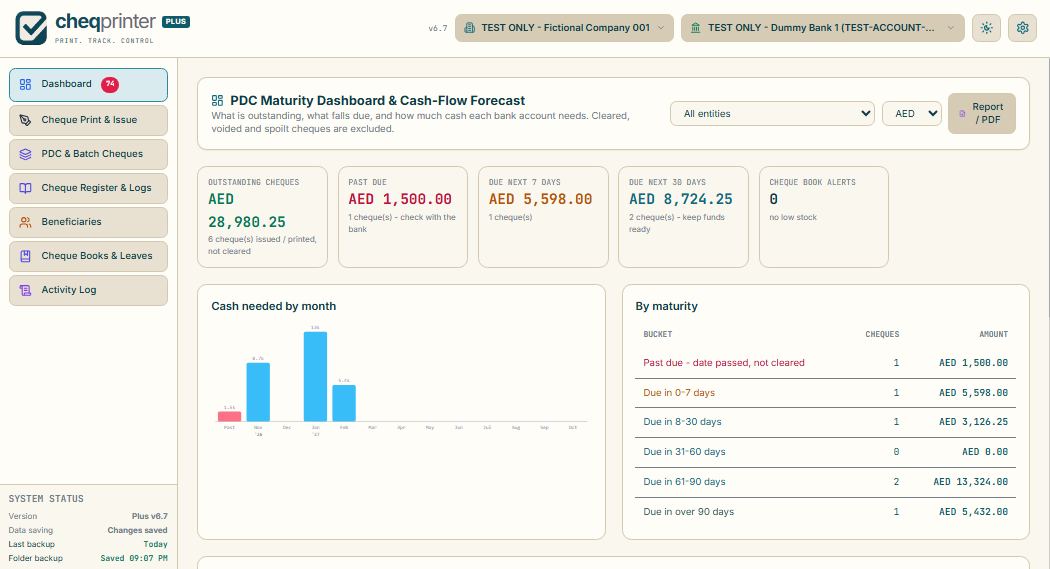
- You use post-dated cheques and want a maturity and cash-flow view
Side by side
| Feature | Lite | Plus |
|---|---|---|
| Cheque writing, live preview and printing | ✓ | ✓ |
| Calibrator and custom templates for any bank (80+ starting layouts) | ✓ | ✓ |
| Printer alignment, test sheet and a saved profile per printer | ✓ | ✓ |
| Country and currency setup, custom currencies | ✓ | ✓ |
| Amount in words (English or Arabic) | ✓ | ✓ |
| Works fully offline | ✓ | ✓ |
| Beneficiaries | ✓ | ✓ |
| Warning before printing a duplicate | ✓ | ✓ |
| Backup and restore, with a storage-usage check | ✓ | ✓ |
| Print history | Unlimited, kept in your browser | Full cheque register |
| Multiple companies and bank accounts | — | ✓ |
| Cheque register, logs and activity history | — | ✓ |
| Batch cheques and installment schedules | — | ✓ |
| PDC maturity and cash-flow dashboard | — | ✓ |
| Cheque book and leaf tracking (unused, voided, spoilt) | — | ✓ |
| Post-print confirmation and spoilt-leaf logging | — | ✓ |
| Invoice payment ledger and per-cheque transaction history | — | ✓ |
| Payment vouchers, remittance advice, Excel / CSV import, PDF reports | — | ✓ |
| Signature or company-seal stamp, transaction and voucher remarks | — | ✓ |
| Optional PIN lock, auto-lock and recovery code | — | ✓ |
What Plus adds, in pictures
Can I start with Lite and move to Plus later?
Yes. Backups made in Lite can be restored in Plus: open Backup / Restore in Lite and download a backup, then open the same dialog in Plus, choose Merge and select the file. Your templates, beneficiaries and printer profiles come with you. Always make a backup before you move.
Which printers work with both?
Both are made for ordinary A4 desktop printers (inkjet or laser). Large photocopiers and A3 machines are not recommended, because a cheque can get stuck in their rollers. See the printer and paper problems guide.
Why are both free?
CheQPrinter is a passion project. Lite and Plus are free, and we plan to keep them that way. In the future we may offer a separate advanced edition, for example a desktop version, for a fee. It would be optional and would not replace or limit these free editions.